

Power Automate vs Traditional Workflow Systems: What Actually Changes?
 Arsénio Ferraz
 Organizations still running workflows built in Nintex, K2, SharePoint Designer, or custom-built systems face growing pressure to modernize. Power Automate has become the default answer for many Microsoft 365 tenants — but is it always the right move? And what actually changes when you make the switch?
The legacy landscape: what most companies are still running
Before diving into comparisons, it is worth being honest about the reality of many organizations in 2026: their “workflow systems” are a patchwork of tools accumulated over years:
- SharePoint Designer 2013 workflows — still running, technically deprecated, creating growing security risks
- Nintex for SharePoint on-premises — powerful but expensive and locked to server infrastructure
- K2 (now Nintex Process Platform) — enterprise-grade but complex to maintain without dedicated specialists
- Custom-built systems — .NET or Java applications built internally, now orphaned by their original developers
- Email chains — the unofficial workflow system that nobody wants to admit is running business-critical processes
Each of these carries a hidden operational debt: maintenance costs, limited connectivity, poor visibility, and the constant risk of breaking when something in the underlying infrastructure changes.
Where Power Automate fundamentally differs
Cloud-native vs. server-bound
Traditional workflow systems were designed for a world where everything lived on-premises. Power Automate was built for the cloud-first reality: it connects to over 1,400 connectors out of the box, runs without infrastructure to maintain, and scales automatically.
When a company migrates from SharePoint Designer or Nintex on-prem to Power Automate, the most immediate change is operational: no more gateway maintenance, no more IIS issues, no more server patching dependencies.
No-code / low-code vs. developer-centric
Nintex and K2 are powerful, but they remain tools that require configuration by specialists. Power Automate inverts this dynamic: a process owner with basic digital literacy can build and own their own flows, with IT governance applied through policies and connectors — not by becoming the exclusive bottleneck.
This is the citizen developer shift, and it has real implications for velocity: processes that used to wait 3 months in an IT backlog can be prototyped in a day.
Cost model: per-usage vs. platform licensing
Traditional workflow tools often charge per workflow execution, per server, or require large upfront licensing costs. Power Automate is included — with meaningful capabilities — in Microsoft 365 Business Standard and above. Premium connectors and per-flow licensing exist for enterprise scenarios, but the entry point is dramatically lower.
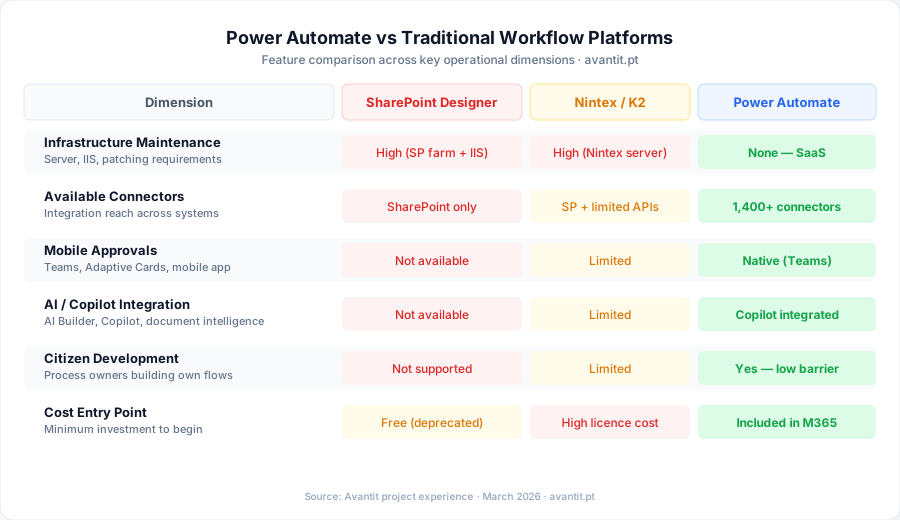
Feature comparison at a glance
| Dimension | SharePoint Designer | Nintex (on-prem) | Power Automate |
|---|---|---|---|
| Maintenance | High (IIS, SP farm) | High (Nintex server) | None (SaaS) |
| Connectors | SharePoint only | SharePoint + some | 1400+ (cloud & on-prem) |
| Mobile approvals | No | Limited | Native (Teams + mobile) |
| AI capabilities | No | Limited | Copilot integrated |
| Governance & DLP | None | Limited | Full M365 policies |
| Citizen development | No | Limited | Yes |
| Audit trail | Basic | Advanced | Advanced |
| Cost (entry) | Included (deprecated) | High | Included in M365 |
When Power Automate is clearly the right answer
At Avantit, we frequently assess these migrations and there are scenarios where the answer is unambiguous:
Migrate to Power Automate when:
- Your workflows run on SharePoint Designer (deprecated since 2020 — this is no longer a “when” question, it is already urgent)
- You are already paying for Microsoft 365 and your workflows only need standard M365 connectors
- You want process owners to maintain their own automations without IT dependency
- You need modern approval experiences (Teams, mobile, Adaptive Cards)
- Compliance and audit trail through Microsoft Purview matters to your organization
Be more careful when:
- You have complex, stateful processes with dozens of conditional branches and long-running transactions that require K2/Nintex-level process orchestration
- You rely heavily on on-premises line-of-business systems with no API (you will need the on-premises data gateway, which adds complexity)
- Your team has deep Nintex expertise and the business value of continuity outweighs the cost of the license
The practical migration path
At Avantit, when we run a migration project from traditional workflow systems to Power Automate, we follow a structured approach:
Phase 1: Workflow inventory and triage
The first step is always to understand what you actually have. Many organizations are surprised to discover they have hundreds of workflows, most of which are either broken, unused, or duplicated.
We typically use PnP PowerShell to extract a full inventory:
# Get all SharePoint Designer workflows from a site collection
Connect-PnPOnline -Url "https://tenant.sharepoint.com/sites/HR" -Interactive

$workflows = Get-PnPWorkflowDefinition -PublishedOnly
$workflows | Select-Object Name, RestrictToScope, RestrictToType, Published |
    Export-Csv -Path ".\workflow-inventory.csv" -NoTypeInformation
Once we have the inventory, we apply a simple triage:
- Decommission: workflows that are broken or serve processes that no longer exist
- Migrate: workflows that are actively used and have a clear Power Automate equivalent
- Redesign: complex workflows that need rethinking, not just replicating
Phase 2: Pilot with a high-visibility process
Never start a migration with your most critical or most complex process. Start with something that:
- Runs frequently enough to validate quickly
- Is visible enough to generate organizational buy-in
- Is simple enough to complete in 1-2 sprints
Expense approval and leave request management are classic starting points. They are universally understood, generate immediate user satisfaction when modernized, and connect naturally to Teams.
Phase 3: Governance before scaling
Before migrating dozens of flows, establish the governance model: who can create flows, what connectors are permitted, how flows are organized in environments (Dev/Test/Prod), and how naming conventions work.
This is the step most organizations skip in their haste to migrate — and it is the one that costs them the most later.
Phase 4: Phased migration by domain
With governance in place, migrate by business domain (HR, Finance, Operations) to maintain context and ownership clarity. Each domain team should have a designated “flow owner” who understands both the process and the tool.
What does not transfer perfectly
Power Automate is not a drop-in replacement for everything Nintex or K2 can do. Organizations should be aware of genuine gaps:
- Long-running processes: Power Automate’s standard cloud flows have execution limits. Processes that take days or weeks need careful design with Dataverse or robust error handling.
- Complex BPM scenarios: If you are modelling full BPMN 2.0 processes with swimlanes, parallel gateways, and subprocess management, Power Automate’s designer is intuitive but less expressive than K2 or dedicated BPMS tools.
- On-premises connectors without API: The data gateway works, but adds operational complexity you did not have before.
Conclusion
The shift from legacy workflow systems to Power Automate is not just a technology migration — it is a change in who owns and maintains processes. For most organizations already inside the Microsoft 365 ecosystem, the business case is clear: lower maintenance burden, faster process iteration, and native integration with Teams, SharePoint, and the entire M365 stack.
The risks are real but manageable: they live in governance, in handling complexity honestly, and in avoiding the temptation to replicate broken processes in a new tool rather than fixing them.
If your organization is running workflows on deprecated tools, or wants an honest assessment of whether Power Automate fits your scenario, Avantit can support you with a targeted workflow audit and a clear migration roadmap.
Get in touch to schedule a diagnostic session.
Editorial Policy
At Avantit, we value authenticity and human expertise. This article was written and reviewed by our experts, ensuring technical accuracy grounded in real-world projects. We do not publish content generated exclusively by AI without validation by one of our consultants.
Share and Comment
Related Topics
Keep reading
More articles on this topic.
Power Platform in 2026: 5 Processes Your Company Still Does Manually
Discover the 5 business processes SMEs still manage in Excel and email in 2026 — and how the Power Platform solves each one in weeks, without a dedicated IT team.
8 minRobotic Automation for SMEs in Portugal: Guide for Distributors and Consultancies
Discover how robotic process automation (RPA) is transforming distributors, consultancies and SMEs in Portugal. Real use cases, selection criteria and how to get started with Microsoft Power Platform.
10 min10 Power Automate Use Cases for Portuguese Companies
Discover 10 practical, real-world Power Automate use cases tailored to Portuguese businesses: approvals, onboarding, invoicing, GDPR compliance and more — with implementation guidance.
9 minIf this sounds familiar because it is your problem, not just curiosity:
Power Platform consultingEnjoyed this article?
Subscribe to our newsletter to receive more content like this or contact us to learn how we can implement these solutions in your company.