


Is Power Apps Secure? Security and Governance Guide for CTOs
 AvantIT Team
 The most frequent question from CTOs and CIOs about Power Apps isn't "what can we build?" but rather "is it secure?". With employees creating applications without going through IT, concerns about data leakage, regulatory compliance, and shadow IT are legitimate. This guide shows you how to implement Power Apps securely, with proper governance and without compromising business agility.
Is Power Apps secure? The short and complete answers
Short answer: Yes, Power Apps is secure — but only if implemented with proper governance.
Complete answer: Power Apps inherits the security model from Microsoft 365 and Azure, which includes multi-factor authentication, encryption in transit and at rest, ISO 27001 certifications, SOC 2, and GDPR compliance. However, security depends on the configuration and governance your organization implements.
The risk isn’t in the platform. It’s in:
- Applications created without IT review
- Connectors accessing sensitive data without control
- Lack of Data Loss Prevention (DLP) policies
- Absence of audit and monitoring
- Misconfigured permissions
The good news: all these risks are controllable with the right tools.
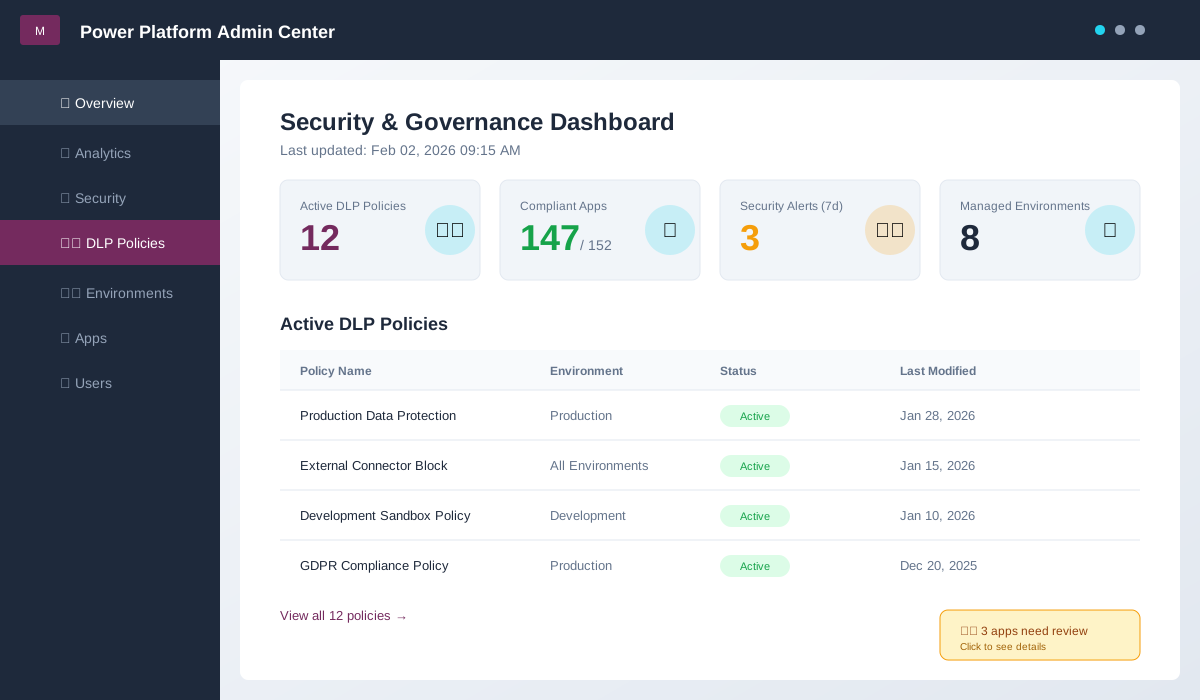
View of Power Platform Admin Center showing active DLP policies, monitored applications, and compliance metrics.
The 5 most common security risks in Power Apps
Before implementing controls, it’s important to understand the specific risks:
1. Data leakage through external connectors
Scenario: an employee creates an app that extracts data from corporate CRM and sends it to a personal Gmail account or stores it in an unapproved external service.
Impact: sensitive data (customers, contracts, pricing) leaves the corporate perimeter without IT visibility.
Prevalence: 40% of organizations without DLP policies report this problem.
2. Uncontrolled shadow IT
Scenario: departments create dozens of applications without IT knowing they exist. When an employee leaves, no one knows what to do with the apps they created.
Impact: orphaned applications, uncontrolled data, invisible dependencies in critical processes.
Prevalence: companies without governance have on average 3-5x more apps than they imagine.
3. Excessive or misconfigured permissions
Scenario: an HR app is shared “with everyone” instead of only with the relevant department. Salary data becomes accessible to the entire organization.
Impact: confidentiality breach, GDPR non-compliance, legal risk.
Prevalence: 25% of applications have broader permissions than necessary.
4. Lack of audit and traceability
Scenario: data is changed or deleted in an application and there’s no record of who did what and when.
Impact: impossible to respond to audits, investigate incidents, or demonstrate compliance.
Prevalence: 60% of organizations don’t activate adequate logs by default.
5. Critical applications without backup or recovery
Scenario: a critical application for operations is accidentally deleted or corrupted, and there’s no backup.
Impact: data loss, process interruption, significant rework.
Prevalence: only 30% of organizations have backup strategies for Power Apps.
Security and governance framework for Power Apps
To implement Power Apps securely, we recommend a 4-layer framework:
Layer 1: Identity and Access Control
Objective: ensure only authorized users access applications and data.
Implementation:
- Mandatory Azure AD/Entra ID: all apps use corporate authentication
- Multi-factor Authentication (MFA): mandatory for app creators and access to sensitive data
- Conditional Access: policies based on location, device, and risk
- Principle of least privilege: users only see/edit data necessary for their role
Tools: Azure AD, Conditional Access, Dataverse roles
Layer 2: Data Loss Prevention (DLP)
Objective: prevent corporate data from being copied to unapproved external services.
Implementation:
- DLP policies per environment: production, development, sandbox with different rules
- Connector classification:
- Business: approved connectors for corporate data (SharePoint, Dataverse, internal SQL Server)
- Non-business: personal connectors blocked or restricted (Gmail, Dropbox, Twitter)
- Blocked: prohibited connectors
- Controlled exceptions: exception requests with IT approval
Practical DLP policy example:
Environment: Production
- Business Data Group: SharePoint, Dataverse, SQL Server, Dynamics 365
- Non-Business Data Group: Personal email, external storage
- Rule: Apps cannot mix connectors from different groups
- Result: impossible to create app that copies from SharePoint to Gmail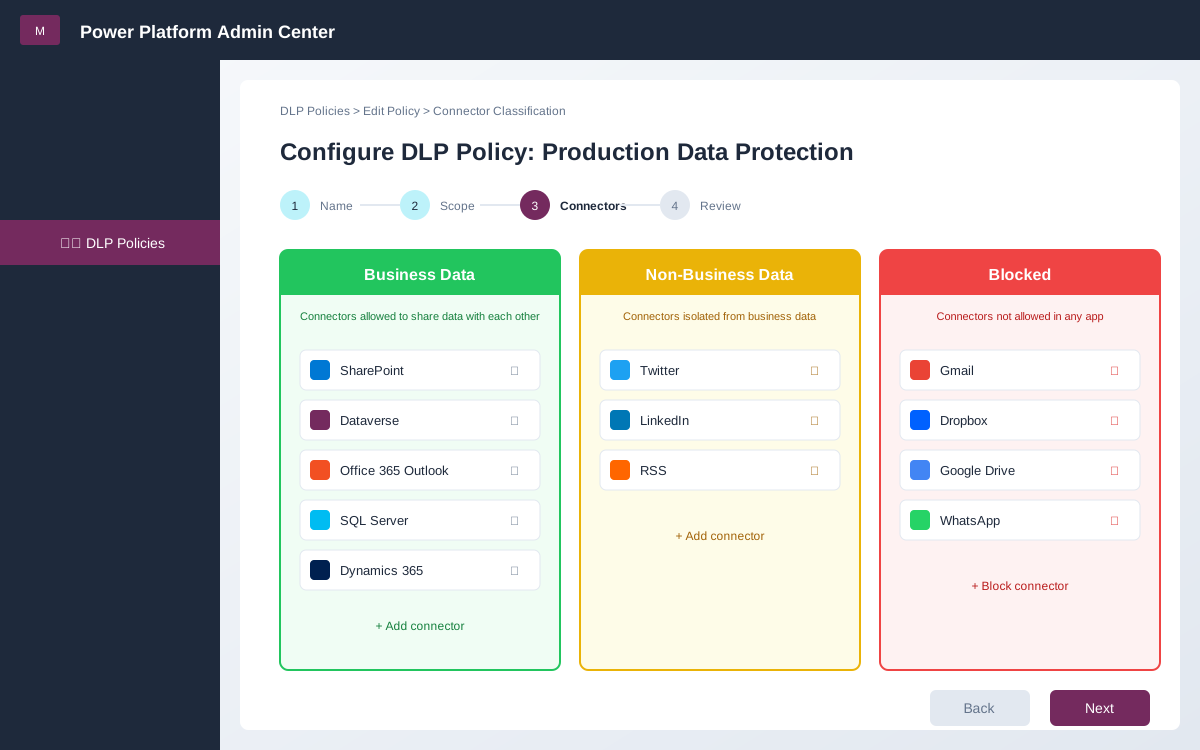
Example of DLP policy configuration classifying connectors into Business and Non-Business groups.
Layer 3: Application Governance
Objective: visibility and control over who creates what, with what data, and for whom.
Implementation:
- Segregated environments: Development, Testing, Production with controlled promotion
- IT approval for production: critical apps go through review before production
- Lifecycle process:
- Development in sandbox environment
- Functional and security testing
- IT approval (architecture + security)
- Production deployment
- Continuous monitoring
- Automated inventory: record of all apps, owners, users, and connectors
- Retention policies: apps inactive for +6 months are archived or deleted
Production approval checklist:
- App has identified owner and backup owner
- Basic documentation exists (purpose, users, data)
- Permissions follow principle of least privilege
- Connectors used are on approved list
- Sensitive data has adequate access controls
- Audit is enabled
- Backup and recovery plan exists
Layer 4: Audit and Monitoring
Objective: detect anomalous behavior, respond to incidents, and demonstrate compliance.
Implementation:
- Unified logs: Power Platform + Azure AD + Microsoft 365
- Automatic alerts:
- App shared with “everyone”
- Blocked connector attempted use
- Abnormal volume of data access
- Changes to DLP policies
- Governance dashboards: real-time metrics on usage, security, and compliance
- Periodic audit: quarterly review of apps, permissions, and owners
Tools: Power Platform Admin Center, Microsoft 365 Defender, Azure Sentinel (for enterprise organizations)
GDPR and regulatory compliance
For organizations in Europe, GDPR compliance is mandatory. Power Apps offers capabilities to support:
GDPR principles applied to Power Apps
1. Data minimization
- Apps only collect strictly necessary data
- Sensitive fields have documented justification
2. Right to access
- Users can request a copy of their data
- Dataverse has APIs to extract data per user
3. Right to erasure (“right to be forgotten”)
- Process to delete a specific user’s data
- Includes data in Dataverse, SharePoint lists, SQL
4. Data portability
- Data exportable in structured format (JSON, CSV)
- APIs available for integration
5. Security and confidentiality
- Encryption in transit (TLS 1.2+) and at rest (AES-256)
- Role-based access and strong authentication
- Audit logs to demonstrate controls
GDPR checklist for Power Apps
- Inventory of personal data processed (name, email, address, etc.)
- Legal basis for processing documented (consent, contract, etc.)
- Data Protection Impact Assessment (DPIA) for apps with sensitive data
- Process to respond to access/erasure requests
- Retention policies defined (how long data is kept)
- Security controls implemented and audited
- Data protection officer (DPO) informed
Important note: if your app processes health, financial, or minor data, additional requirements apply (e.g., ISO 27001 certification, periodic audits).
How to implement governance without killing agility
The main business concern is: “if we implement strict controls, do we lose the agility advantages of low-code?”
The answer is no, if done right.
Balanced governance model
Environments by maturity:
-
Personal/Sandbox (total self-service)
- Any user can create apps to test
- Test data only, no connectors to critical systems
- Apps cannot be widely shared
- Automatic recycling after 90 days of inactivity
-
Development (self-service with rules)
- Teams can develop apps for their department
- Business connectors allowed, external blocked
- Sharing restricted to department
- Manager approval required
-
Production (complete governance)
- Mandatory IT review
- Architecture and security approval
- Continuous monitoring
- Defined SLA, automatic backup
- Mandatory documentation
Result: employees maintain autonomy to solve quick problems (85% of cases), but IT has control over critical apps (15% that really matter).
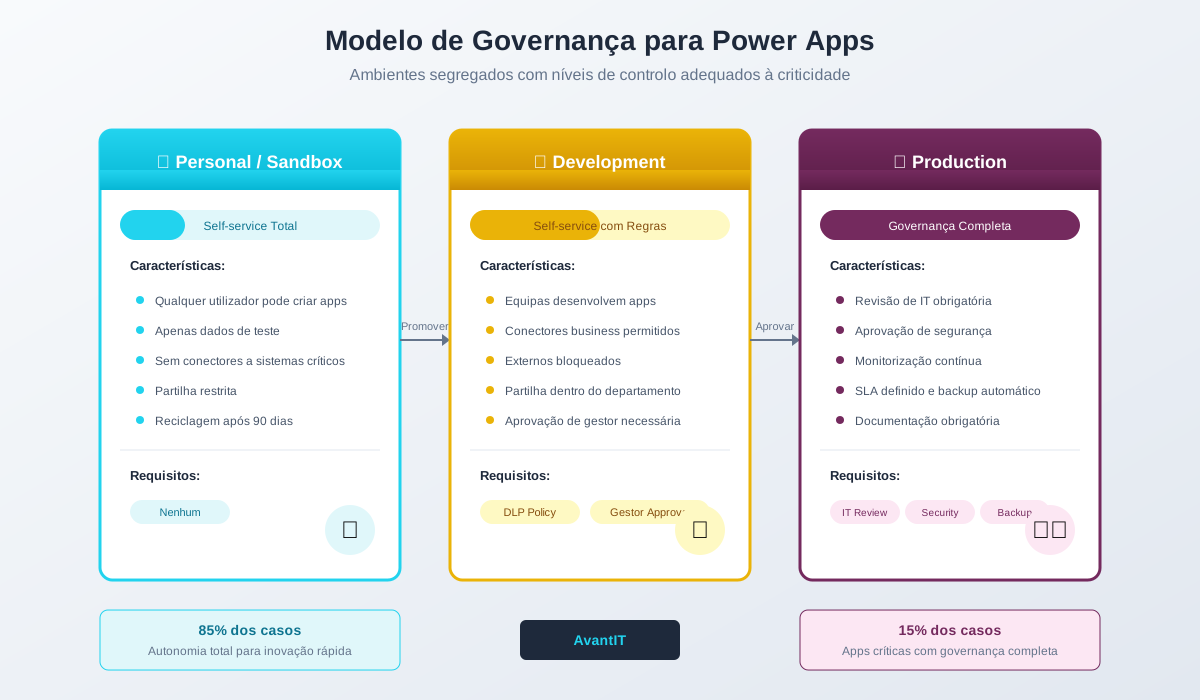
Environment structure with different control levels based on criticality and maturity.
Security best practices for app creators
If you’re an IT manager implementing Power Apps, these are the best practices to teach creators:
For citizen developers
-
Always use corporate data when possible
- Prefer SharePoint or Dataverse over Excel files or emails
- Avoid copying data to personal services
-
Apply principle of least privilege
- Share app only with those who need it
- Never use “share with everyone” without IT approval
-
Document minimally
- What is the app’s purpose?
- Who should have access?
- What data does it use and why?
-
Test permissions
- Verify users only see the data they should
- Test with accounts from different roles
-
Ask for help when in doubt
- If unsure about something’s security, ask IT
- Better prevent than remediate
For IT teams
-
Automate app discovery
- Use Power Platform CoE Starter Kit
- Configure alerts for new apps
-
Educate before blocking
- Training on security and governance
- Clear communication channels for questions
-
Make doing right easy
- Approved templates ready to use
- Pre-configured business connectors
- Accessible documentation
-
Measure and improve
- Track compliance metrics
- Identify risk patterns
- Adjust policies based on data
Essential tools for Power Apps governance
Power Platform Admin Center (included in Microsoft 365)
- Environment and DLP policy management
- Apps and users inventory
- Usage and compliance metrics
Power Platform CoE Starter Kit (free)
- Advanced governance dashboards
- Discovery and inventory automation
- Approval workflows
- Custom alerts
Microsoft 365 Defender (included in E5 licenses)
- Anomaly and threat detection
- Security alerts
- Incident investigation
Azure Sentinel (for enterprise)
- Complete SIEM for unified logs
- Advanced threat detection
- Automated incident response
When to involve external specialists
Implementing Power Apps governance doesn’t always require external consultants, but there are scenarios where it makes sense:
Makes sense if:
- ✅ You have +100 app creator users
- ✅ You process highly sensitive data (health, financial)
- ✅ You’re subject to strict regulation (GDPR, HIPAA, Sox)
- ✅ You’ve had security incidents related to shadow IT
- ✅ IT has no prior experience with Power Platform
Can do internally if:
- You have IT team familiar with Microsoft 365 and Azure
- App volume is manageable (<50 apps)
- Data isn’t critical or highly sensitive
- You have time to learn and implement gradually
Recommended hybrid model:
- Initial consulting to design governance framework (2-3 weeks)
- Joint implementation of base policies (1 month)
- Knowledge transfer to IT (training)
- IT assumes operation with point support
AvantIT helps organizations implement Power Platform governance from policy design to internal team training.
Checklist: are you ready to implement Power Apps securely?
Use this checklist to assess your organization’s maturity:
Identity and Access
- Azure AD is the only authentication method
- MFA is active for app creators
- Conditional Access has configured policies
- Users only have necessary permissions
Data Loss Prevention
- DLP policy is active in production environment
- Connectors are classified (business, non-business, blocked)
- Documented and approved exceptions exist
- Policies are reviewed quarterly
Governance
- Segregated environments (dev, test, prod) exist
- Production approval process is defined
- Apps and owners inventory exists
- Orphaned apps are identified and handled
Audit
- Audit logs are active
- Alerts for anomalous behavior are configured
- Governance dashboard is reviewed regularly
- Incident response process exists
Compliance
- Personal data inventory is documented
- Legal basis for processing is known
- GDPR request response process exists
- DPO (if applicable) is involved
Result:
- 10-15 checks: solid governance, continue improving
- 5-9 checks: reasonable base, significant gaps to fill
- 0-4 checks: high risk, urgent implementation needed
Conclusion: security and agility are not opposites
Power Apps is secure when implemented with proper governance. The question isn’t “do we block or allow?” but rather “how do we allow in a controlled way?”
Organizations that get Power Platform governance right achieve:
- ✅ 70% reduction in solution time-to-market
- ✅ Maintained regulatory compliance
- ✅ Eliminated uncontrolled shadow IT
- ✅ Complete visibility over data and access
- ✅ Quick response to audits
Investment in governance doesn’t slow down business — it accelerates it sustainably.
Next step: use this article’s checklist to assess your organization’s current state. If you identified 5+ gaps, contact us to discuss how to implement governance without compromising agility.
About AvantIT: we are a Microsoft Partner specialized in Power Platform, with focus on security and governance. We help organizations implement Power Apps securely and scalably since 2015. Learn about our Power Platform services.
Editorial Policy
At Avantit, we value authenticity and human expertise. This article was written and reviewed by our experts, ensuring technical accuracy grounded in real-world projects. We do not publish content generated exclusively by AI without validation by one of our consultants.
Share and Comment
Related Topics
Keep reading
More articles on this topic.
File and Version Chaos in Teams: The Invisible Cost Slowing Your Team Down
Duplicate files, lost versions and "which one is the final document?" in Microsoft Teams cost time and money. Discover where the problem comes from and how to solve it strategically.
11 minCopilot Without Governance: The Risks of Adopting AI With No Policy
Many companies scale Microsoft Copilot and create hundreds of agents with no inventory, no lifecycle and no data policy. Here are the real governance risks — and how to fix them.
10 minEU AI Act: What Your Company Needs to Know (and Do) in 2026
A clear guide for CEOs and DPOs of European SMEs: what changes with the EU AI Act in force, what Microsoft already guarantees in M365 Copilot, and what your company still needs to do.
9 minIf this sounds familiar because it is your problem, not just curiosity:
Copilot governance and adoptionEnjoyed this article?
Subscribe to our newsletter to receive more content like this or contact us to learn how we can implement these solutions in your company.