


10 Power Automate Use Cases for Portuguese Companies
 Arsénio Ferraz
 Power Automate is available in most Microsoft 365 licences — yet it remains one of the most underused tools across Portuguese organizations. Not because there is a lack of use cases, but because there is a lack of concrete, locally adapted examples. This article presents 10 practical scenarios, with Portuguese context, to help teams understand where to start.
Why Power Automate is relevant for Portuguese companies
Before the use cases, a piece of context: based on our experience in projects with national SMEs and mid-sized companies, most still manage approvals by email, onboarding via paper or Excel checklists, and reporting through manual exports.
Power Automate does not require heavy development. With an existing Microsoft 365 licence, it is possible to automate real processes in days — not months.
1. Expense reports and representation cost approvals
The problem: employees submit expenses by email or in Excel. Approvers respond when they remember. The finance department logs them manually. The process takes days and has no audit trail.
The solution: a Power Automate flow triggered by a Microsoft Forms (or Power Apps) submission automatically sends an approval request to the direct manager via Teams or email with an Adaptive Card. Upon approval, the record goes directly to a SharePoint list or Dataverse for processing by the finance team.
Typical impact: 70% reduction in approval cycle time. Full visibility into the status of each request.
Key capabilities: Power Automate native approvals, Adaptive Cards in Teams, Microsoft Forms integration.
2. New employee onboarding
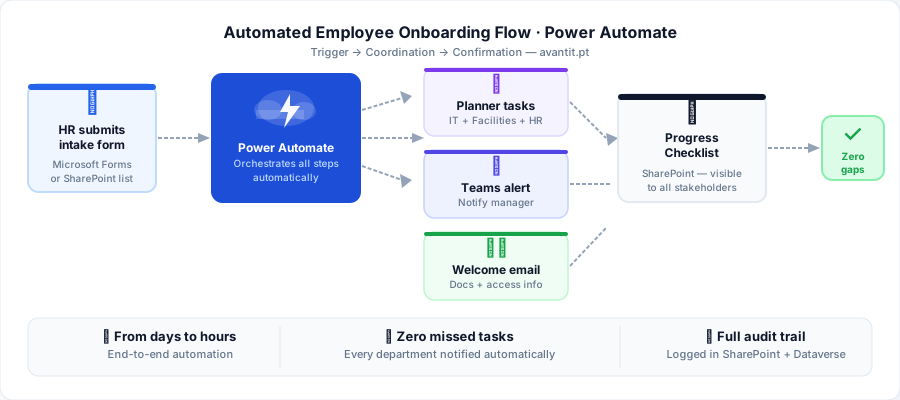
The problem: when a new employee joins, dozens of tasks need to be executed by HR, IT, and the direct manager — account creation, equipment assignment, system access, documentation dispatch. Without automated coordination, something always falls through the cracks.
The solution: a flow triggered by an entry in a SharePoint list (or via a Microsoft Forms submitted by HR) automatically creates tasks in Planner for each department, sends welcome documentation emails, notifies the manager, and creates a progress checklist visible to all parties.
Typical impact: zero missed tasks. 60% reduction in time spent by IT and HR on coordination communications.
Key capabilities: Microsoft Planner, SharePoint, automated email dispatch, conditions based on contract type.
3. Holiday and absence management (integrated with HRMS)
The problem: holiday requests by email, manager approval without visibility into team calendar, manual registration in the HR system. Frequent errors, overlaps, and employees without timely confirmation.
The solution: the employee fills in a request via Microsoft Forms or Power Apps. Power Automate checks team availability in the Outlook calendar, sends an approval request to the manager via Teams, and — upon approval — automatically updates SharePoint, sends confirmation to the employee, and exports to the HR system via API or file.
Portuguese context: we frequently integrate with systems such as PHC, Primavera, or Sage via automatic file export to the system’s import folder, when no API is available.
Typical impact: approval process reduced from 3 days to under 4 hours.
4. Contract expiry alert automation
The problem: contracts with suppliers, clients, or partners are stored in shared folders and nobody receives alerts when they are about to expire. Renewals are missed or handled at the last minute.
The solution: a SharePoint list maintains all contracts with their expiry date. A scheduled flow runs daily, checks contracts expiring in the next 30, 60, and 90 days, and sends automatic notifications to the contract owner and their manager.
Verification frequency: Daily (at 08:00)
Alerts sent: 90 days, 60 days, 30 days, 7 days before expiry
Channel: Email + Teams notification to the responsible person
Action: Direct link to the document in SharePoint
Typical impact: zero missed renewals. Complete elimination of manual monitoring.
5. Supplier invoice processing with AI Builder
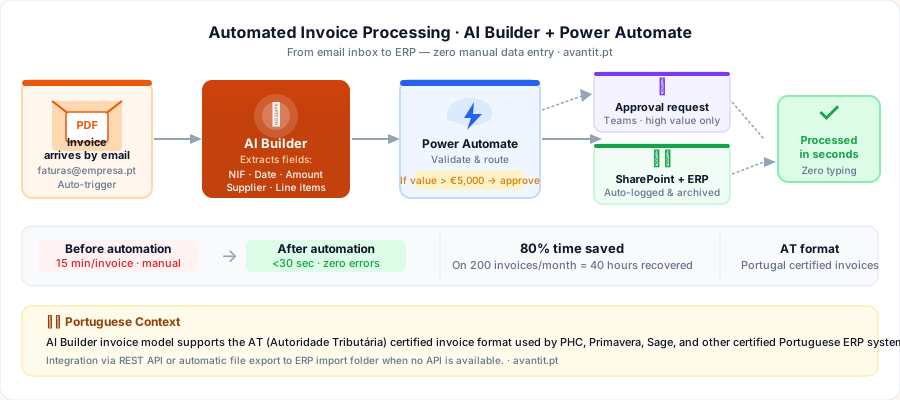
The problem: invoices arrive by email as PDFs. An employee opens each one, manually extracts the data (supplier, VAT number, amount, date), enters it into the ERP, and files it. With 50 to 200 invoices per month, this consumes significant hours with a high risk of error.
The solution: a Power Automate flow monitors a dedicated mailbox (e.g. invoices@company.pt). When an email with a PDF attachment arrives, AI Builder automatically extracts invoice fields (date, number, supplier VAT number, amount, line items). Data is validated and sent for approval when the value exceeds a threshold, or directly logged in SharePoint/Dataverse for ERP integration.
Portuguese context: the AI Builder invoice extraction model has been trained with invoices in the AT (Autoridade Tributária) format and supports the common structure of invoices issued by certified systems in Portugal.
Typical impact: 80% reduction in invoice processing time. Near-zero error rate on key fields.
6. Commercial proposal submission and approval
The problem: the sales team submits proposals by email for internal approval before sending to the client. The process is informal, lacks versioning, and approvers frequently do not have enough context to decide quickly.
The solution: the proposal is created in a SharePoint template. Upon submission for approval, a Power Automate flow sends the approver a Teams card with a proposal summary (client, value, margin, deadline), a link to the document, and approve/reject buttons with a comments field. Upon approval, the status is updated and the salesperson receives an automatic notification to proceed.
Typical impact: approval time reduced from 2 days to 2 hours. Complete, auditable approval history.
7. Data synchronization between systems without an API
The problem: the company uses two systems that do not communicate with each other (e.g., internal CRM and ERP). Customer or order data must be manually copied between systems daily.
The solution: Power Automate can act as a lightweight middleware. With access to CSV or Excel files exported from one system, a scheduled flow processes the rows, applies the necessary transformations, and inserts the data into the target system via API, import file, or directly into SharePoint/Dataverse as an intermediate layer.
Technical note: for integrations with systems such as PHC, Primavera, Sage, or other Portuguese ERPs without native connectors, we use Power Automate’s Custom Connector or HTTP actions to call REST APIs where available.
8. Internal support request management (IT, Facilities)
The problem: support requests arrive by email, Teams, or phone call. There is no centralized record, requests get lost, and there is no visibility into the workload of support teams.
The solution: a Power Apps or Microsoft Forms form centralizes request submission. A Power Automate flow automatically creates an entry in a SharePoint list (or Dataverse), assigns the request to the correct technician based on category, sends confirmation to the requester with a reference number, and sends automatic reminders if the request is not processed within the defined SLA.
Typical impact: full visibility over open requests. Faster response times. Data to optimize support team allocation.
9. Automated periodic report distribution
The problem: every Monday, an employee spends 2 hours opening Power BI, exporting reports, and sending them by email to the correct distribution list. When they are absent, the reports are not sent.
The solution: a scheduled Power Automate flow automatically exports reports from Power BI Service via API, attaches them to a formatted email, and sends them to the defined distribution list — with no human intervention. It can include conditional logic: for example, only sending the commercial report if anomalies exceed a threshold.
Typical configuration:
- Trigger: Recurrence (Monday at 08:30)
- Action: Export Power BI report (PDF or XLSX format)
- Action: Send email with the file attached
- Recipients: M365 distribution group
Typical impact: elimination of 8-10 hours per month per employee. Zero dependency on presence for report dispatch.
10. GDPR compliance: data access and deletion requests
The problem: a data subject sends an email requesting access to or deletion of their data (right of access or right to erasure, under GDPR). The company has no structured process to respond within the 30-day legal deadline. The process is manual, not auditable, and difficult to scale.
The solution: a dedicated form (Power Apps or Microsoft Forms) receives formal GDPR requests. A Power Automate flow logs the request with a timestamp in SharePoint, notifies the DPO and system owners holding the data subject’s information, creates verification tasks in Planner for each relevant system, and generates automatic alerts at D-7 and D-1 before the 30-day deadline. The final response to the data subject is generated from a template based on the actions taken.
Portuguese context: with the increasing enforcement activity from the CNPD (Comissão Nacional de Proteção de Dados), having this process documented and auditable has been, for several of our clients, decisive in demonstrating compliance and avoiding fines.
Typical impact: structured compliance. Complete audit trail per request. Elimination of the risk of missing the legal response deadline.
Where to start?
Do not try to implement all 10 use cases at once. The approach we recommend at Avantit is simple:
- Identify the most painful process — the one that most frequently causes complaints, errors, or delays
- Validate that your data is structured — Power Automate works best with data in SharePoint lists, Forms, or Dataverse rather than loose files
- Build a pilot in 1-2 weeks — with a simple use case to build internal confidence in the tool
- Establish governance before scaling — define who can create flows, how they are named, and where they live in M365 environments
If you are unsure where to begin, or want to validate which processes have the highest return for your specific context, Avantit runs diagnostic sessions focused on identifying the 3-5 processes with the greatest automation potential.
Get in touch to schedule your session.
Editorial Policy
At Avantit, we value authenticity and human expertise. This article was written and reviewed by our experts, ensuring technical accuracy grounded in real-world projects. We do not publish content generated exclusively by AI without validation by one of our consultants.
Share and Comment
Related Topics
Keep reading
More articles on this topic.
Power Platform in 2026: 5 Processes Your Company Still Does Manually
Discover the 5 business processes SMEs still manage in Excel and email in 2026 — and how the Power Platform solves each one in weeks, without a dedicated IT team.
8 minRobotic Automation for SMEs in Portugal: Guide for Distributors and Consultancies
Discover how robotic process automation (RPA) is transforming distributors, consultancies and SMEs in Portugal. Real use cases, selection criteria and how to get started with Microsoft Power Platform.
10 minPower Automate vs Traditional Workflow Systems: What Actually Changes?
Compare Power Automate with Nintex, K2 and SharePoint Designer: when to migrate, cost differences, real migration challenges and why the switch pays off for Microsoft 365 organizations.
7 minIf this sounds familiar because it is your problem, not just curiosity:
Power Platform consultingEnjoyed this article?
Subscribe to our newsletter to receive more content like this or contact us to learn how we can implement these solutions in your company.